How NOT to detect residential proxies
IP databases can't stop residential proxies without burning real users.
Truesign Team
4 min read
What are residential proxies
They even made it to mainstream media. Free VPN apps, “free TV” boxes, browser extensions that give you something for nothing, cheap IoT devices from dubious manufacturers … Many of them include a “proxy SDK”, which means trojan software that abuse utilizes your device to forward requests from thousands of people you don’t know to all kinds of websites, out of your control. Some of these providers ask you for permission first and call themselves ethical proxy providers, most others don’t. The result is the same: your home / office / mobile connection is now used for whatever objectives the proxy users have.
Why would anyone use residential proxies ?
When you crawl content or launch credential-stuffing or card-testing attacks at scale, you can’t do it from a single IP because you’d be blocked immediately. You need proxies. Many sites outright block datacenter IP ranges due to frequent abuse, so nowadays the best options are residential and mobile proxies. Expensive a few years ago, they’ve become commodified and anyone can buy access to global pools of millions of real people’s IPs for $1.25/GB.
Detecting residential proxies the legacy way
If you have a residential proxy problem on your site, you probably can’t get rid of it on your own and will need a third-party service. There are IP intelligence vendors that track residential proxy IPs. They do so by subscribing to lots of proxy services and connecting to instrumented servers through them, effectively scraping the infected IPs. Later when you ask the vendor about an IP, they’ll tell you whether they’ve seen it.
But remember those IPs also belong to real people who navigate the internet! They buy online and sign in to stuff. The infected node can be a corporate laptop or a mobile phone behind a CGNAT, with hundreds of unrelated devices sharing the same IP to reach the internet. When you block tainted IPs from accessing your server, you are blocking many real users that have nothing to do with a compromised device.
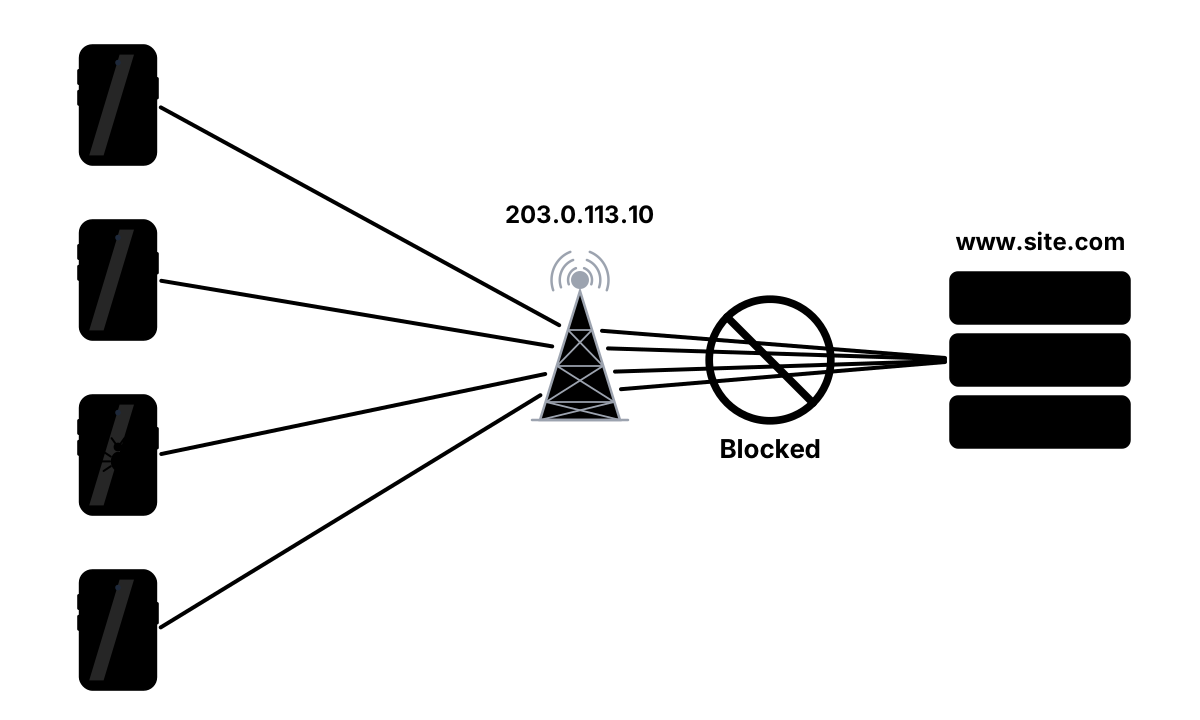
Not all anonymous visitors are attackers
Sites lose money when they block IP anonymizers. From our experience, 4% to 7% of a site’s traffic are legitimate users browsing behind a VPN. Sites blocking datacenter ranges are already losing customers, and when you add residential IP blocks, the damage only gets bigger.
There should be a better solution
At Truesign, we don’t rely on scraping infected IPs like other vendors out there. We developed proprietary technology that analyzes a network exchange in real time and determines whether the source is behind a proxy or not.
Behind Truesign’s anonymizer score there are years of research and lessons learned. All the different VPN technologies, pass-through and back-connect proxies, scraping services and Tor connection modes have specific network patterns: how the TCP/IP conversation is conducted, how the device and intermediate nodes behave under specific responses, timing and formatting patterns that differ per implementation.
Truesign classifies these patterns in real time based on a single HTTP request from the browser to our servers, while avoiding corner cases that cause false positives. Don’t take our word for it! Try submitting this form or accessing this page with and without a VPN to see our technology in action.
NOTE
A reader commented to us that Cloudflare and other vendors were doing real-time proxy detection by looking at TLS, HTTP headers, HTTP/2 metadata, etc.
Actually that has nothing to do with proxies, that’s agent fingerprinting: the User-Agent says “Chrome/153.0” but the HTTP or TLS fingerprint is that of
curlor python’srequests, something’s off.Truesign ALSO does agent fingerprinting to detect simple bots, and is able to detect more sophisticated automated browsers with our
invisible.jstag.But we’re talking proxies here, and as far as we know, no other vendor has the real-time network analysis capabilities we have.
A legitimate device accesses your site at 9:00 and at 9:01 a proxy request goes out through the same IP. With the IP database approach both requests look equally suspicious, but real-time network analysis sees two completely different connections.
You detected them, now what ?
Truesign grants your users a token with encrypted information about them. Inside it you’ll find an anonymizer score of 0 (no anonymizer), 7 (very likely) and 9 (definitely an anonymizer), and Truesign rules allow you to block only requests with a score of 9 to avoid false positives.
But visiting your site through a VPN or proxy doesn’t imply bad intentions. If you simply block anyone behind a VPN you’ll lose legitimate users and probably even get a bad reputation out there. Per-IP analysis is sometimes the wrong unit of analysis.
24/7 security team
Truesign is continuously monitoring your traffic and is able to link independent suspicious requests to an attack launched by a single actor. You can configure protection rules that allow individual visitors behind anonymizers, but block requests that are part of a proxy attack once it’s detected.
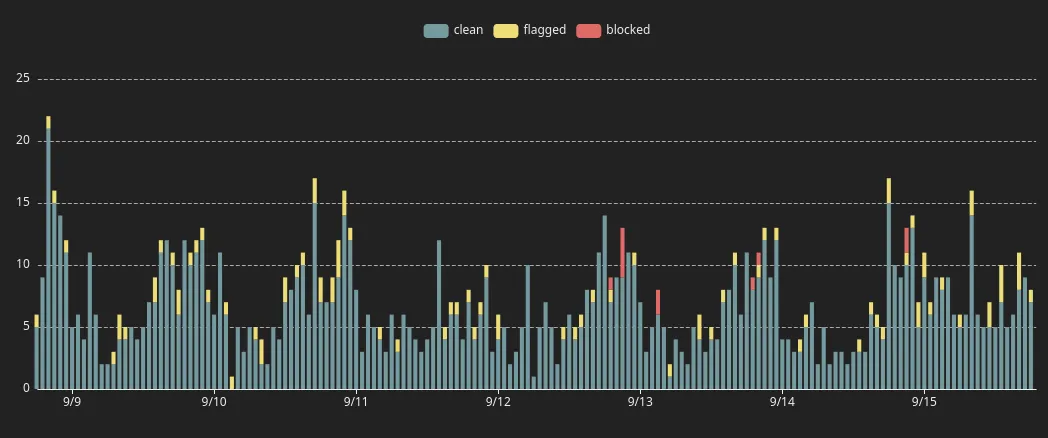
Other “brute force” vendors sell you access to their IP databases at enterprise-like prices. With us, you get real-time information about your visitors and continuous traffic monitoring even on our Free subscription.
Understand your traffic
Curious to know whether your site has a proxy problem? Give Truesign detection a try:
- create a Free account and set up your rules
- optionally embed our
invisible.jsscript on your site to detect advanced bots - decide where to plug us in: account registration, checkout, access to public content, etc.
- start reading the information inside our tokens for a few days without blocking anything, head to Truesign’s dashboard to get an accurate view of your actual situation